DNS and nameservers
A domain is only useful once it points somewhere. Everything needed to do that — and to prove it worked — is in the panel, included with the registration.
Records you can edit
Seven record types, edited directly on the domain. No ticket, no waiting for anyone to apply a change on your behalf.
| Type | What it does |
|---|---|
| A | Point the domain at an IPv4 address. |
| AAAA | Point the domain at an IPv6 address. |
| CNAME | Alias a name to another name — how most platforms want a subdomain. |
| MX | Send mail on your domain to a mail provider. |
| TXT | Verification, SPF, DKIM and DMARC. |
| NS | Delegate a subdomain to another set of nameservers. |
| SRV | Advertise a service on a host and port. |
Check what the world actually sees
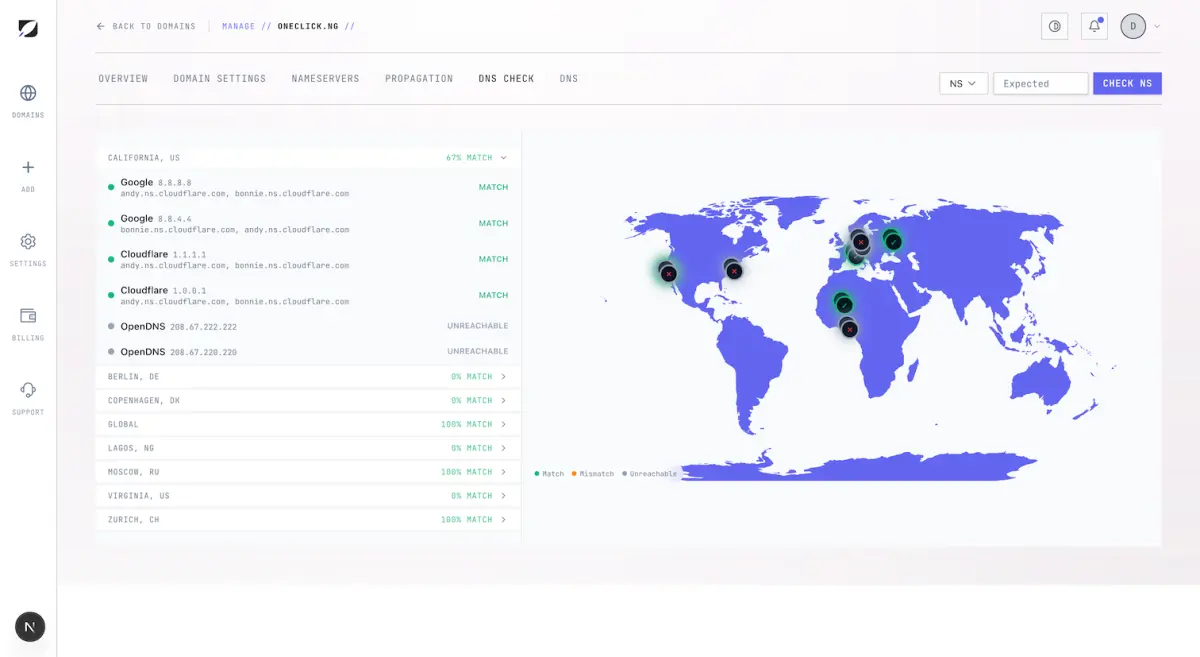
The hard part of DNS is never making the change; it is knowing whether the change arrived. The DNS check asks twenty public resolvers the question directly and shows you each answer side by side — Google, Cloudflare, Quad9, OpenDNS, Verisign, AdGuard, CleanBrowsing, Yandex, Gcore, Neustar and ipNX in Nigeria, which is the one that matters if your visitors are here and the global resolvers are not the network they are on.
Each resolver is marked match, mismatch or unreachable, and the result carries a confidence rating — high, medium or low — so a check that could only reach four resolvers does not read like a check that reached twenty.
Nameservers
Set between two and five nameservers on the domain, from presets or by typing your own. Presets cover the common cases — our nameservers, an apex record, a www record, or a custom set for a provider that wants its own.
After a change, the propagation check tells you which resolvers have picked up the new delegation, so you know when it is safe to move a site rather than guessing from your own browser cache.
Working with Cloudflare
Plenty of Nigerian sites keep DNS at Cloudflare and the registration here. That works, and there is a shared-access arrangement for it: invite us to the zone as a DNS editor or a zone administrator, and both sides can make changes.
The useful part is drift detection. The panel keeps a snapshot of what the zone looked like and tells you whether it is still clean or has drifted — so a record somebody changed on the other side is something you find out about, rather than something you discover when mail stops arriving.
DNS editor
Can change records in the zone. The narrower of the two roles, and the one to use unless there is a reason not to.
Zone admin
Can change zone settings as well as records — for when the zone itself needs configuring, not only what it answers.
Drift detection
The panel reports the zone as clean, drifted, or unknown, so an out-of-band change is visible instead of silent.
Common questions
- How long do DNS changes take to appear?
- It depends on the TTL on the record and on what each resolver has cached. Rather than guess, use the DNS check: it queries twenty public resolvers directly and shows you which ones already have the new answer and which are still serving the old one.
- How many nameservers can I set?
- Between two and five. That is the registry’s rule, not ours — a single nameserver leaves a domain with no redundancy, so two is the floor.
- Can I use Cloudflare with a domain registered here?
- Yes. Point your nameservers at Cloudflare and manage records there, or use the shared access arrangement so both sides can edit and we can tell you when the two have drifted apart.
- What is a propagation check?
- It asks public resolvers what they currently return for your domain, so you can see a change spreading rather than refreshing your own browser and hoping.
- Can I edit DNS from my phone?
- Yes, in the Deploy iPhone app. There is no Android app; on Android use the web panel, which works on a phone browser.
Pointing a domain at something specific
If you know where you are sending the domain, the connection guides give the exact records for Vercel, Netlify, Shopify, Wix, WordPress.com, Google Sites and OneBit Deploy — taken from each platform's own documentation, with the source linked.
See a domain's current nameservers
The check tool reads a domain's live nameservers from public DNS, whether or not it is registered with us.
Check a domain